Humans, Computers & Interactions
Where HCI came from, why it's multi-disciplinary, ubiquitous computing, human perception, two-way task-centred interaction, the HCI space, and its applications.
▶Lecture videos
Click any timestamp — here or inside the notes — to jump the video to that moment. Your position is remembered.
Computers, Humans and Interactions
The three words in "HCI": what a computer is today, how humans perceive, and what interaction means.
00:02The components: computers, humans, interaction00:50Computers are everywhere: the interfaces we use02:30Humans: senses and perception04:09The same word means different things ("credit")05:43People perceive differently; design must support the right perception08:22Exercise: how do you perceive "apple"? Context matters10:57Designing for many people who perceive differently11:47Interaction as a two-way process12:37Intentional vs unintentional interactionHCI Map
The map of topics covered in this module.
00:00Introduction: the HCI map01:37User and context of use02:23Interaction between human and computer03:18Why study HCI: complex computers, limited humans04:56Human limitations and the cost of bad design (time, money)06:40HCI as a multidisciplinary disciplineHCI Space
Where HCI sits under Human Factors Engineering, and the technologies, ideas and domains where HCI applies.
00:02Why the scope of HCI is confusing — so many related terms01:10Human Factors Engineering umbrella: industrial design, product design, HCI01:50Inside HCI: UI design, UX design, interaction design02:50HCI is more than usability and interface design03:40Applications in 3 groups: technologies, ideas, domains04:35Ideas: social, affective, context-sensitive, gesture/touch, info-vis, CSCW06:08Domains: special needs, education, healthcare, security, games1History of HCI
- HCI emerged as a formal academic and engineering discipline in the late 1970s and early 1980s. The term was coined and popularised around 1980.
- Its ideas are much older. Before digital computers existed, the field was Human-Machine Interaction (HMI).
- A "machine" could be anything: a juice blender, a power tool, a weapon, an early TV, a motorbike.
- HMI asked how to design machinery that is safe, ergonomic and suited to human operators.
In his essay "As We May Think", American scientist Dr. Vannevar Bush predicted that human knowledge and thinking would be amplified by machines. The human stays at the centre while technology fades into the background.
2HCI is multi-disciplinary
HCI isn't an isolated branch of computer science. It combines many fields:
| Discipline | What it contributes |
|---|---|
| 💻 Computer Science & Engineering | Software architecture, graphics, interface toolkits, input/output devices, systems engineering |
| 🧠 Cognitive Psychology | Memory, attention span, visual perception, mental models, cognitive load |
| 📐 Ergonomics & Human Factors | Physical comfort, biomechanics, posture, sensory limits, workstation safety |
| 🎨 Arts, Design & Aesthetics | Typography, visual hierarchy, spatial balance, colour theory, emotional design |
| 👥 Sociology & Anthropology | Group collaboration, cultural expectations, workplace dynamics, technology adoption |
| 🌐 Diversified domains | Medicine, aviation, agriculture, defence, finance, industrial automation, each with strict needs |
Because HCI serves such different fields, one-size-fits-all design fails. User requirements, environments and risk tolerance differ hugely. A game can tolerate errors; an aircraft cockpit cannot.
3Computers today: ubiquitous computing
What do you picture when you hear "computer"? A desktop tower, a laptop, a phone, a smartwatch?
Computing power is embedded everywhere. Cars, electronic car keys, smart TVs, AC consoles, ATMs, fridges, rice cookers and digital pens are all computers in disguise. It's hard to find an appliance without an embedded processor.
So HCI isn't only about desktop screens. It covers interaction with any computing device 01:50.
4Humans and perception
Humans sense the world through five senses:
| Sense | Role in HCI |
|---|---|
| 👀 Seeing (visual) | Primary: screens, colours, layout |
| 👂 Hearing (auditory) | Alerts, speech UIs, feedback chimes |
| ✋ Feeling (haptic) | Touchscreens, vibration, tactile keys |
| 👅 Taste (gustatory) | Experimental niches only |
| 👃 Smell (olfactory) | Rare, experimental simulations |
Sensing is only the first step. Perception is shaped by prior experience, memories, culture, skills and emotions. How a person interprets input depends on cognitive framing (context).
Takeaway: all three listeners hear the same word, but their internal processing gives different meanings, depending on contextual expectations. Designers must remember that users interpret interfaces through their own context.
5Interaction: two-way and task-centred
In HCI, interaction is a continuous two-way dialogue:
Intentional vs unintentional interaction
🎯 Intentional
The user consciously acts and expects a response.
Example: printing. You click Print, the OS asks for settings or starts the job, then confirms or reports an error.
📷 Unintentional
The system observes or reacts to the user's presence or behaviour without a conscious command.
Example: smart building access. A camera detects your face and sends it to face recognition. The door unlocks, or stays closed with an alert.
Interactions take place to accomplish a TASK. The user really interacts with the task; the interface only mediates. If users struggle with the interface instead of their goal, they get frustrated. Good interfaces become invisible, like a video game where players feel inside the game world and don't think about the controller buttons.
6The HCI space
The video asks where HCI fits among the many related terms: human factors, usability, UX, interaction design, ergonomics, product design 00:02.
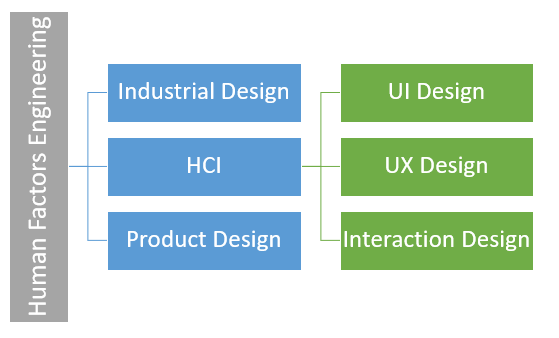
| Level | Contains |
|---|---|
| Human Factors Engineering (the big umbrella) | Everything about human factors and designing interfaces and products 01:10 |
| → Industrial design, product design | Mostly the ergonomic side, plus interaction |
| → HCI | Specifically interaction between humans and computers: any computing device, from big computers to airport kiosks |
| → → UI design | User interface design |
| → → UX design | User experience design |
| → → Interaction design | Designing the interactions themselves |
HCI
Focuses on computerised and digital components.
E.g. designing a car's touchscreen dashboard: climate settings, navigation.
Human Factors Engineering
Covers digital and non-computing physical components.
E.g. the angle and diameter of the steering wheel, seat lumbar support, pedal distances.
"I know majority of you might have imagined HCI is simply the usability and interface design." Usability and UI design are just one part. HCI covers much more, as this module shows.
How interface design evolved
- Early era: HCI was strictly about on-screen desktop UI. Interfaces went from tele-typewriters to command-line interfaces (CLI) to graphical user interfaces (GUI, windows), and mice went from mechanical roller-ball to optical laser sensors.
- Today: UX design looks holistically at user psychology, context, hardware constraints and seamless workflows. Rigorous testing and iterative refinement are the foundations of good UX.
7Applications of HCI — three pillars
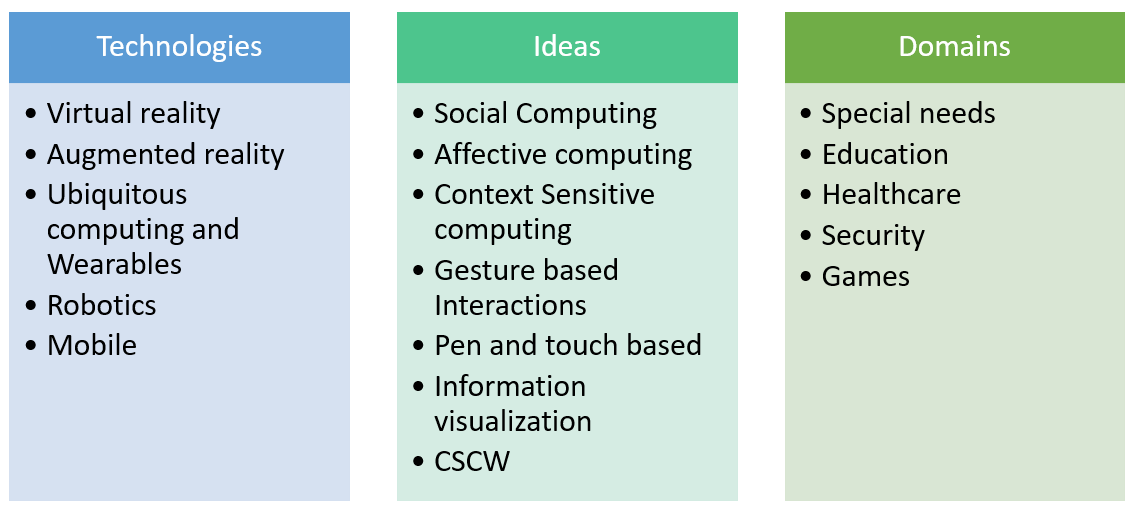
| Pillar | Members |
|---|---|
| 1. Technologies | VR, AR, ubiquitous & wearables, human-robot interaction, mobile |
| 2. Ideas & paradigms | Social computing, affective computing, context-sensitive computing, gesture/pen/touch UI, (information visualization), CSCW |
| 3. Domains | Special needs & accessibility, education, healthcare, security & biometrics, games |
Likely questions: "Explain the HCI space with a diagram" (draw Figure 1.1), "What is ubiquitous computing?", "Differentiate intentional and unintentional interaction with examples", and "Give HCI applications under technologies, ideas and domains".
8Quick revision sheet
| Concept | Remember it as |
|---|---|
| Origin | HMI → HCI, late 1970s/early 1980s; term ~1980 |
| Vannevar Bush | 1945, "As We May Think": human at the centre, tech in the background |
| Multi-disciplinary | CS · cognitive psychology · ergonomics · design/arts · sociology · domains |
| Ubiquitous computing | Processors embedded everywhere (ATMs, cars, rice cookers) |
| Senses | Sight (primary), hearing, touch; taste and smell are experimental |
| Perception | Shaped by context and experience: the "credit" example |
| Interaction | Two-way: input ⇄ feedback |
| Intentional / unintentional | Click Print / face-recognition door |
| Task-centred | Users interact with the task; the interface should be invisible |
| HCI space | Human Factors Eng. → {Industrial, HCI, Product design}; HCI → |
| HCI vs HFE | Digital only vs digital + physical |
| Applications | Technologies · Ideas · Domains |
?Self-check quiz
11 questions on this week. Answer them all, then press Check my answers. Your best and latest scores are saved and shown on the subject page.