Interaction Models, Ergonomics & Styles
Domain–goal–task, Norman's 7 stages and the two gulfs, slips vs mistakes, the Abowd & Beale framework, ergonomics, direct vs indirect manipulation, and interaction styles.
▶Lecture videos
Click any timestamp — here or inside the notes — to jump the video to that moment. Your position is remembered.
Interactions
What interaction is: domain, goal and tasks.
00:01What interaction is: communication between user and system00:48Input: natural language vs computer language03:23Many ways to interact: typing, voice, camera, sensors05:41Feedback as assurance06:26Why modelling interaction is hard: varied users and contexts10:28Physical design: the mouse and the hand13:01Interaction as user, system and task13:46Example: booking a taxi through an app18:43Even simple interactions have many stages21:48Everyday example: tying a shoelace while running24:13Breaking an interaction into basic artifactsDonald Norman's Model
The 7 stages of action, execution and evaluation.
00:00Introduction: goals, actions, system state01:39The elaborated seven-stage view02:24Example: joining an online lecture05:27Perceiving and interpreting the new system state07:49Preconceptions and evaluation09:27Execution cycle and evaluation cycle10:18Mismatches between execution and evaluation11:53Gulf of Execution and Gulf of EvaluationSlips and Mistakes
Two kinds of human error and how each is fixed.
00:00Two types of error: slips and mistakes00:43Slip example: pressing the wrong arrow button01:24Mistakes: the user doesn't know what to do (wrong goal)01:55Slips are fixed by design, mistakes by educating the userAbowd & Beale Framework
User, Input, System, Output, and the four translations in the execution and evaluation cycles.
00:00User articulates action as input; system presents output01:06Articulation, performance, presentation, observation02:33Novice users need more support than experienced users04:10Execution cycle vs evaluation cycleErgonomics
Physical characteristics of interaction: placing controls, environment, health, colours.
00:30Ergonomics = the physical characteristics of interaction00:58Why each button and textbox is where it is01:48Environment, health, hot vs cool colours, colour blindness02:35Web-safe coloursDirect & Indirect Manipulation
Bolding a word vs painting a real wall through a simulator.
00:00Direct manipulation: select a word, click Bold00:50Indirect manipulation: the painting-simulator example01:42Interaction styles overview1What is interaction?
Interaction is the communication dialogue between two or more parties. In HCI it is the back-and-forth exchange between the user and the system.
- Between people, communication uses natural language, body language, facial gestures and emotional cues.
- In HCI, it goes through input actions (clicks, keystrokes, touch, voice) and system outputs (displays, audio feedback, haptics).
Three dimensions of interaction
| Dimension | Meaning | Example: online vehicle hiring |
|---|---|---|
| Domain (context) | The real-world area under consideration | Online vehicle hiring service |
| Goal (objective) | What the user ultimately wants to achieve | Hire a vehicle online for transport |
| Task(s) (operations) | The concrete step-by-step actions to reach the goal | 1. Open the app or website 2. Enter pickup, destination, passengers, time, vehicle type 3. Review options and prices 4. Confirm, or reject/modify |
A back-and-forth series of interactions between user and system achieves the goal.
2Donald Norman's model — 7 stages
Norman's model looks at interaction from the user's cognitive perspective. The user is at the centre. It has two loops:
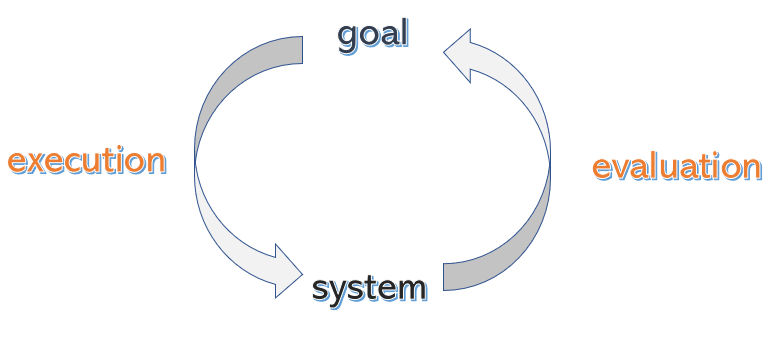
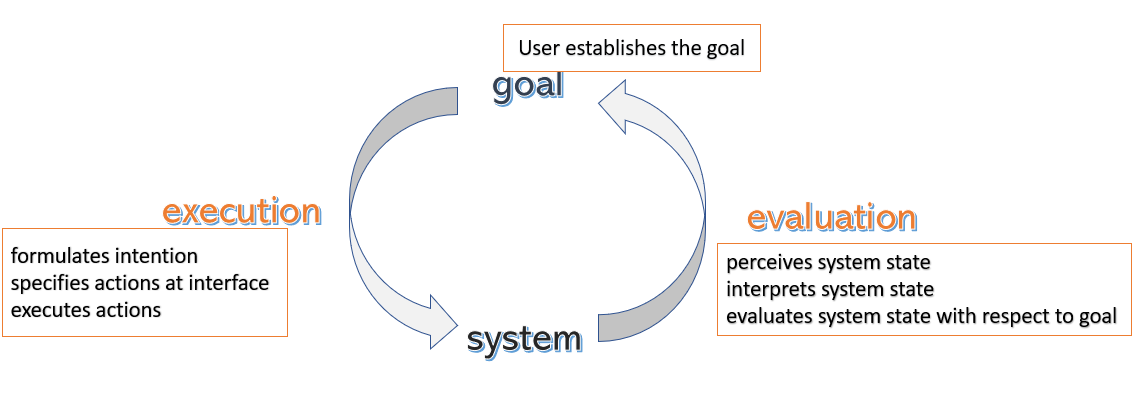
⚙️ Execution loop
How the user turns an internal goal into concrete actions and executes them on the interface.
🔍 Evaluation loop
How the user perceives the new system state, interprets the feedback and evaluates whether the goal was achieved.
| # | Stage | AC example | Loop |
|---|---|---|---|
| 1 | Establish the goal | "Make the room cooler" | — |
| 2 | Form the intention | "Reduce the AC temperature" | Execution |
| 3 | Specify the action sequence | "Press the down-arrow button on the remote" | Execution |
| 4 | Execute the action | Physically press it | Execution |
| 5 | Perceive the system state | Hear the beep, see the display, feel cool air | Evaluation |
| 6 | Interpret the system state | "The display now reads 22 °C" | Evaluation |
| 7 | Evaluate against the goal | "Is the room cool enough now?" | Evaluation |
Action specification depends on the situation
Goal = cool the room, intention = adjust the AC. The specified actions change with the physical situation:
| # | Situation | Action sequence |
|---|---|---|
| 1 | Remote within reach | Pick it up and press temperature-down |
| 2 | Remote near another person | Ask that person to adjust it |
| 3 | Remote across the room, you're alone | Stand up, walk across, get the remote, adjust |
Iterative evaluation: if the room doesn't cool (e.g. the AC is broken), evaluation fails. The user revisits the goal and forms a new intention, such as switching on the fan or moving to another room.
3The two gulfs
Norman's key insight is where interaction breaks down:
⚡ Gulf of Execution
The gap between the user's intended actions and the actions the interface actually supports.
"Does the interface give me controls to easily do what I want?"
📊 Gulf of Evaluation
The gap between the system's actual state and the user's ability to perceive and interpret it against the goal.
"Can I easily tell what state the system is in, and whether I succeeded?"
Good UI/UX bridges both gulfs:
- Execution gulf: narrow it with clear affordances and intuitive mapping.
- Evaluation gulf: narrow it with immediate, informative feedback.
- Wide gulf of execution: a microwave with 20 unlabeled buttons. You know you want to "reheat 1 minute" but can't see how.
- Wide gulf of evaluation: a file upload with no progress bar. Did it work? Is it still going?
4Human errors: slips vs mistakes
Humans make errors. There are two kinds 00:00:
| ⚠️ Slip (execution failure) | ❌ Mistake (planning / mental failure) | |
|---|---|---|
| Goal and plan | Correct goal, correct plan | Wrong goal or intention |
| What goes wrong | The action is performed wrongly: motor error, distraction, poor ergonomics | The user misunderstands the system or has a wrong mental model or lacks knowledge |
| Example | You want channel 8, but the tiny, cramped buttons make you press 9. Or you want to lower the temperature but hit the up arrow 00:43 | A user thinks the TV shows only one broadcast and doesn't know channels can be changed |
| Severity | Easier to manage | More severe 01:24 |
| Fix | Change the design: better layout, larger targets, undo, confirmation dialogs | Educate the user 01:55: training, onboarding, clear status cues, documentation |
A slip = right plan, wrong execution (fix the interface). A mistake = wrong plan (fix the user's knowledge).
5The Abowd & Beale framework
To address limitations in Norman's model (which focuses only on the user), Gregory Abowd and Russell Beale proposed a 4-component framework. It treats interaction as translations between languages:
| Component | Language |
|---|---|
| U – User | Task language (psychological) |
| I – Input | Input language (hardware and controls) |
| S – System | Core language (data and logic) |
| O – Output | Output language (display and presentation) |
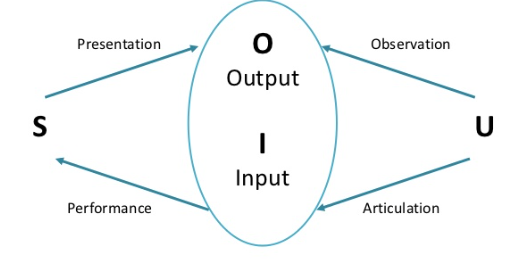
The four translations
| # | Translation | Direction | Meaning | Cycle |
|---|---|---|---|---|
| 1 | Articulation | U → I | User expresses an intention in the input language (typing, dragging) | Execution |
| 2 | Performance | I → S | Input changes the system core's state | Execution |
| 3 | Presentation | S → O | The state change is shown through the output language | Evaluation |
| 4 | Observation | O → U | User perceives the output and evaluates it against the goal | Evaluation |
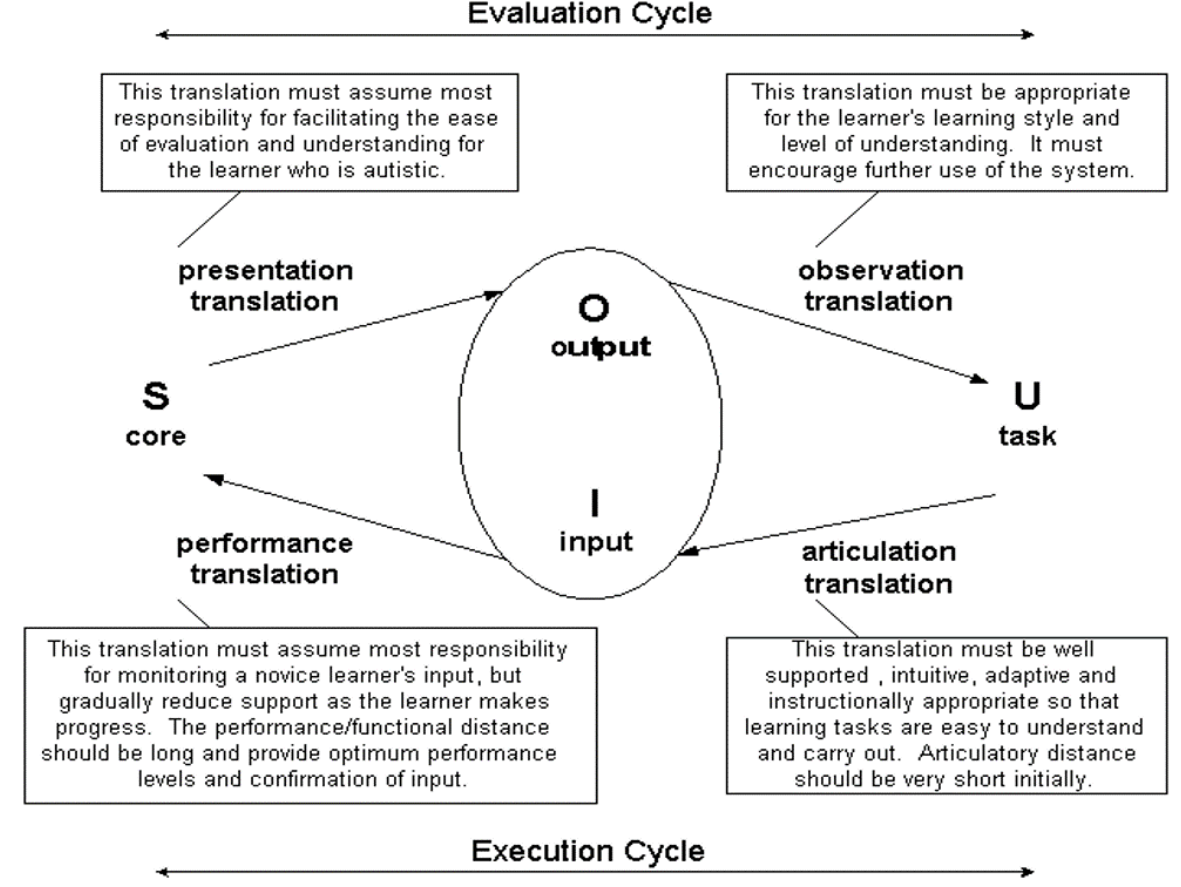
The lecturer stresses that the level of support the interface gives should depend on the user. A novice needs a lot of help in articulation and in interpreting output. An experienced user gains familiarity and can handle a more advanced interface without step-by-step guidance 03:35.
Compare Norman vs Abowd & Beale:
- Norman is user-centred only: 7 stages, 2 gulfs.
- Abowd & Beale models both user and system: 4 components (U, I, S, O) and 4 translations. Articulation + performance = execution; presentation + observation = evaluation.
6Ergonomics
Cognitive models deal with the mind. Ergonomics studies the physical characteristics of interaction 00:30: physical, environmental and physiological. It is often called human factors.
| Area | Concerns |
|---|---|
| 🎛️ Arrangement of controls and displays | Logical grouping, functional spacing, placement by frequency of use, preventing accidental actuation |
| 🏞️ Environmental conditions | Ambient lighting (glare, dark mode), noise, vibration, temperature (industrial settings) |
| 🩺 Health and biomechanics | Preventing RSI (repetitive strain injury), posture, eye fatigue, visual overload |
| 🎨 Use of colour | Colour-blind accessibility (deuteranopia/protanopia: red–green), contrast, culturally appropriate colour coding |
"From today onwards, you need to know why you keep the text boxes where they are and why you keep the command buttons where they are." Designing interfaces is not simply making them look nice; it's about making them easy to work with 01:48.
- Hot colours (red, orange) are for warnings; cool colours (blue, green) are for information.
- Remember colour-blind users who can't separate red from green. Never rely on colour alone.
- Web-safe colours 02:35 were a set of colours that displayed correctly on every old display (256 colours). Today displays show millions of colours, but the principle of consistent visibility still applies.
7Direct vs indirect manipulation
| 🖱️ Direct manipulation | 🏗️ Indirect manipulation | |
|---|---|---|
| Meaning | The user acts directly on visual representations of objects in the system | The user acts on a simulated interface, but the real change happens on a physical object somewhere else |
| Example | Select a word and click Bold 00:00; drag a shape's handles to resize it | A virtual painting simulator for a building: choose a wall colour on screen, and robotic painters paint the real wall 00:50 |
8Interaction styles
Each style trades off flexibility, ease of learning, screen space and error rate:
| # | Style | Description | Example |
|---|---|---|---|
| 1 | ⌨️ Command Line Interface (CLI) | Typed text commands; fast expert control, low overhead | bash, terminal |
| 2 | 📋 Menus | Predefined options; recognition rather than recall reduces memory load | App menus |
| 3 | 🗣️ Natural language | Speech and conversational interfaces | Siri, Alexa, chatbots |
| 4 | ❓ Question/answer and query | Guided wizards and database queries step by step | Installation wizard |
| 5 | 📑 Form-fills and spreadsheets | Structured input for bulk data entry and validation | Registration form, Excel |
| 6 | 🖥 WIMP / point-and-click | Windows, Icons, Menus, Pointer; uses spatial memory | Desktop OS |
| 7 | 🌐 3D interfaces | Spatial manipulation in VR/AR with 6-DOF tracking | VR headset apps |
| 8 | 👋 Kinetic and haptic | Gestures, force-feedback gloves, vibration | Kinect, game controllers |
The Design of Everyday Things by Don Norman, Chapter 2: "The Psychology of Everyday Actions".
9Quick revision sheet
| Concept | Remember it as |
|---|---|
| Interaction | Two-way dialogue; Domain → Goal → Tasks |
| Norman's 7 stages | Goal → Intention → Action spec → Execute → Perceive → Interpret → Evaluate |
| Two loops | Execution (2–4), Evaluation (5–7) |
| Gulf of execution | Intended actions vs actions allowed; fix with affordances and mapping |
| Gulf of evaluation | System state vs the user's ability to interpret it; fix with feedback |
| Slip | Right plan, wrong action (tiny buttons); fix the design |
| Mistake | Wrong goal or mental model; educate the user |
| Abowd & Beale | U-I-S-O; Articulation, Performance (execution) · Presentation, Observation (evaluation) |
| Ergonomics | Physical side: controls, environment, health, colour |
| Direct / indirect | Bold a word / paint a real wall via a simulator |
| Styles | CLI · Menus · Natural language · Q&A/query · Forms · WIMP · 3D · Kinetic/haptic |
?Self-check quiz
11 questions on this week. Answer them all, then press Check my answers. Your best and latest scores are saved and shown on the subject page.