Feedback Cycles & Levels of Design
Action, interaction, effect and feedback; feedback cycles everywhere; the bridges of execution and evaluation; Norman's 7 questions from the designer's and user's side; visceral, behavioural and reflective design.
▶Lecture videos
Click any timestamp — here or inside the notes — to jump the video to that moment. Your position is remembered.
Feedback Cycles
What a feedback cycle is, with the kettle, volume and bank-transfer examples, and why we learn through feedback.
00:01Feedback cycles form when people interact with the world00:37Feedback on the effect, not the effect itself01:29Example 1: boiling water in a kettle02:59Example 2: adjusting the sound-system volume03:43Example 3: online bank money transfer06:09Ubiquitous: everywhere and almost invisible06:39Why feedback cycles matter: we learn through themEffect of Actions
Action vs interaction, effects on both parties, and missing feedback in an online lecture.
00:00What is feedback? A response to an action or interaction00:51Interaction = the effect of an action between two or more objects02:07Example: the lecturer talking to students03:36"Causes effect on one another"04:51No feedback in an online lecture (mics muted, cameras off)05:40Why feedback is important: did my intention succeed?The 7 Questions – Designer's Perspective
The seven diagnostic questions a designer asks.
00:00Feedback cycles and learning00:53Perceive, interpret, compare with the goal02:28Gulf of Execution03:21Gulf of Evaluation04:06Why feedback cycles matter: bridging the gulfs06:44The designer designs, users use07:42Design should guide the user09:17Norman's seven questions for designers10:58What actions are possible? Mapping from intention to action12:36Mapping from system state to interpretationThe 7 Questions – User's Perspective
The same seven stages as questions in the user's mind.
00:00End of designer's questions: interpret and compare with goal00:40User's perspective: What do I want to do?01:14What alternatives are there? What can I do?01:53How do I do it? What happened? What does it mean?02:52Is it okay? These questions help both users and designersLevels of Design
Visceral, behavioural and reflective levels and how sensory input flows through them.
00:02Norman's three levels of design00:36Visceral: closest to physical action and senses01:48Behavioural is interpretative; reflective is high-level thought02:31Flow from sensory input to motor output03:59Reflective isn't directly bound to sensory input or motor output1Action, interaction, effect, feedback
These four words are easy to mix up:
| Term | Meaning | Lecture example: the lecturer talking |
|---|---|---|
| Action | Something one party does | The lecturer talks |
| Interaction | The effect of an action carried out between two or more objects, causing effects on one another 00:51 | Students hear it and process it (senses → perception → cognition) |
| Effect | The change caused by the action | Students learn something. The lecturer is affected too: they keep wondering whether students understand 03:36 |
| Feedback | A response that informs the actor about the outcome of their action 00:00 | Missing: mics muted, cameras off, chat unread, so there's no synchronous feedback 04:51 |
"If I see what has happened to you based on my action, then I know exactly whether my intention was successful." Without feedback, the actor can't tell whether the action worked.
2Feedback cycles are everywhere
Feedback cycles form when people interact with the world (anything and everything around us) 00:01. They're so common we rarely notice them: they're ubiquitous.
People learn through feedback cycles. Act → observe the consequence → evaluate → adjust future behaviour. A success message confirms your actions were right. An error message also teaches you that something was wrong. Either way, the next interaction improves 07:17.
Ubiquitous computing (sensors + hardware + ML/AI, everywhere and almost invisible) is a special area of HCI and human-centred computing 06:09.
3Norman's model revisited: the two bridges
Mapping Norman's 7 stages between the user's goal and the world (the physical system) gives two bridges:
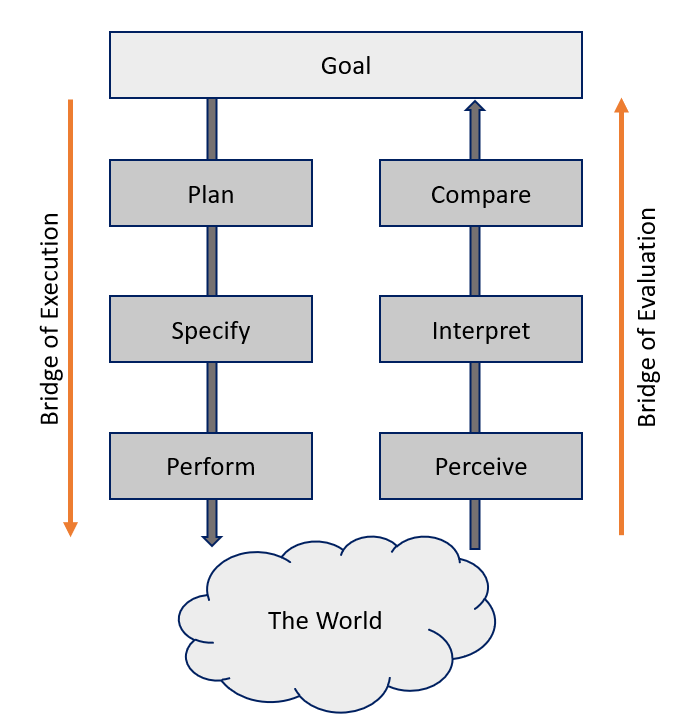
🌉 Bridge of Execution (goal → world)
- Plan: form a strategy for the goal
- Specify: map it to concrete interface actions
- Perform: physically operate the controls
🔍 Bridge of Evaluation (world → goal)
- Perceive: sense the status change
- Interpret: work out what the feedback means
- Compare: check the outcome against the goal
The bridges are how the gulfs of execution and evaluation (Week 2) get crossed.
4The 7 questions — designer & user perspectives
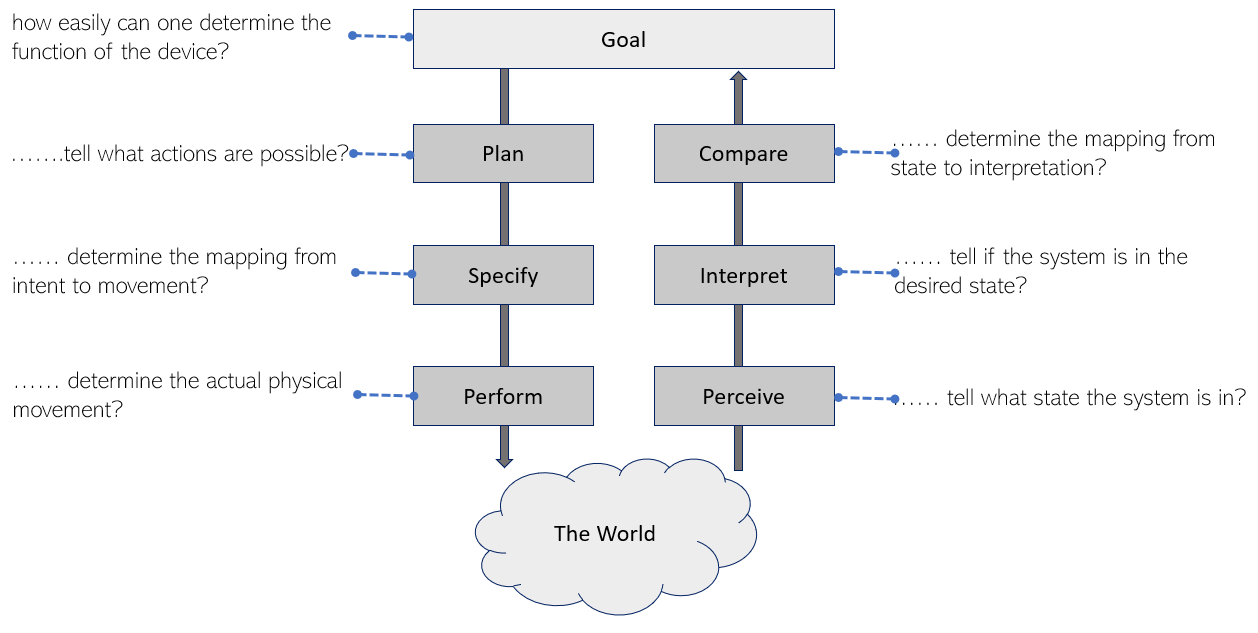
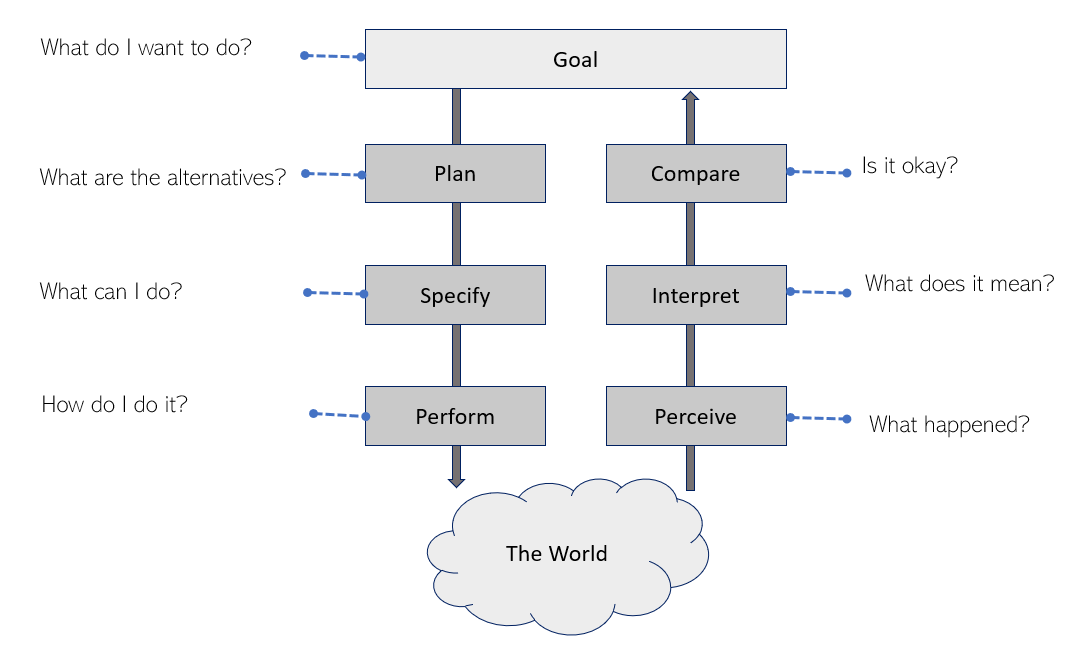
The same 7 stages become questions. Designers use them to audit an interface; users ask them (subconsciously) while interacting 02:52.
| Stage | 🛠 Designer asks (how easily can the user…) | 🙋 User asks |
|---|---|---|
| 1. Goal | …determine the function of the device? | "What do I want to accomplish?" |
| 2. Plan | …tell what actions are possible? | "What are the alternatives?" |
| 3. Specify | …map intention to physical controls (natural mapping)? | "What can I do now?" |
| 4. Execute | …perform the action (click, swipe, press)? | "How do I do it?" |
| 5. Perceive | …perceive the state change (clear feedback)? | "What happened?" |
| 6. Interpret | …understand what the state means? | "What does it mean?" |
| 7. Evaluate | …confirm the state meets the goal? | "Is this okay? Have I done what I set out to do?" |
Stages 1–4 are the execution phase; stages 5–7 are the evaluation phase.
5Norman's three levels of design
Norman maps the action cycle onto three levels of cognitive processing 00:02:
.PNG)
| Level | Nature | Governs (action cycle) | Design concerns | Example: a smartphone |
|---|---|---|---|---|
| 👁️ Visceral | Immediate, subconscious sensory response; closest to physical action and senses 00:36 | Execution (performing) and perception | First impressions: look, beauty, feel, sound | Sleek glass, colour, the satisfying click |
| ⚙️ Behavioural | Practical use, interpretative 01:48 | Action specification and interpretation | How well it works: usability, responsiveness, ergonomic efficiency | Fast unlock, smooth scrolling, easy camera |
| 👑 Reflective | Conscious, highest-level thought; reflecting on what was received | Goal and final evaluation | Meaning: self-image, pride of ownership, brand loyalty, satisfaction looking back | "I'm proud to own this brand", memories |
Sensory input first reaches the visceral level and also the behavioural level. The behavioural level combines visceral and reflective input to interpret. The reflective level is pure thought and is not directly bound to sensory input or motor output 03:59. Motor output is driven through the behavioural and visceral levels together.
Reframed as depth of thinking
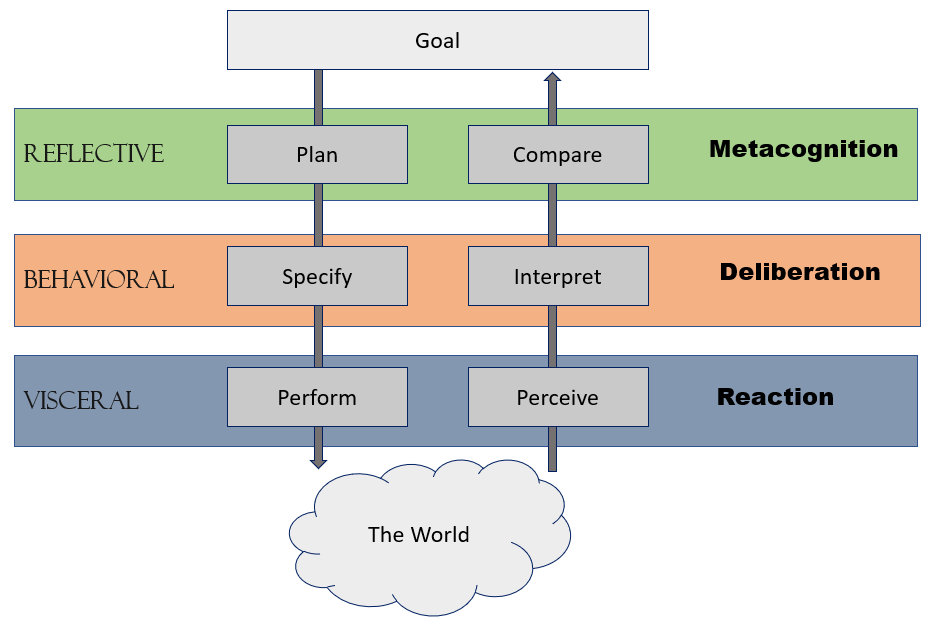
| Tier | Level | Description |
|---|---|---|
| Lowest | Reaction (visceral) | Subconscious reflexes and immediate sensory capture tied to the physical world |
| Middle | Deliberation (behavioural) | Forming specific action sequences and decoding feedback to finish the task |
| Top | Metacognition (reflective) | Thinking about one's own thinking: judging strategies, solving new edge cases, emotional fulfilment |
Feedback should clearly inform without being distracting, noisy or intrusive.
Expect:
- "Explain feedback cycles with examples" (kettle, volume, bank transfer)
- "List Norman's 7 questions from the designer's and user's perspectives"
- "Explain the visceral, behavioural and reflective levels with an example product"
6Quick revision sheet
| Concept | Remember it as |
|---|---|
| Interaction | Effect of an action between 2+ objects, affecting one another |
| Feedback | Information about the effect, returned to the actor |
| Effect vs feedback | Volume increases (effect) vs you hear it louder (feedback) |
| Examples | Kettle whistle · volume · bank "success/failed" · ATM · robots |
| Why | We learn through feedback cycles, so the next interaction improves |
| Bridge of execution | Plan → Specify → Perform |
| Bridge of evaluation | Perceive → Interpret → Compare |
| Designer's 7 Qs | How easily can the user determine function / tell actions / map / perform / perceive / interpret / evaluate |
| User's 7 Qs | What do I want? Alternatives? What can I do? How? What happened? What does it mean? Is it okay? |
| Visceral | Look and feel; reaction |
| Behavioural | Usability; deliberation |
| Reflective | Meaning, pride, brand; metacognition |
?Self-check quiz
10 questions on this week. Answer them all, then press Check my answers. Your best and latest scores are saved and shown on the subject page.