Design Principles, Guidelines & Standards
The authority vs generality spectrum; Norman's principles, Nielsen's 10 heuristics and Shneiderman's 8 golden rules; the 15 universal design principles with live good-vs-bad demos.
▶Lecture videos
Click any timestamp — here or inside the notes — to jump the video to that moment. Your position is remembered.
Principles, Guidelines and Standards
How the three kinds of design rules differ.
00:00Introduction: rules that govern design01:40Design is free, but guided02:28Principles: general and flexible04:05Standards: specific and enforced04:52Guidelines: in between05:41Generality vs authority (principles → guidelines → standards)06:29ISO 9241: a user-centred design standard08:02Where the design principles come from08:57Common design principlesDesign Principles – Different Presentations
The sets of principles proposed by different authors.
00:01Different presentations of the principles00:50Shneiderman's eight golden rules03:36Norman's design principles: knowledge in the head and in the world05:14Visibility of system state06:01Exploit the power of constraints06:51Design for error: reversibility07:37Standardise when all else fails08:29Nielsen's ten heuristics09:18Recognition rather than recall10:04Help and documentation (the last heuristic)10:53Constantine and Lockwood's six principlesDesign Principles – Set 01
The first group of the 15 principles.
00:00Discoverability: making functions visible02:33Minimise memory load (Nielsen)03:18Feedback: timely and informative05:44Different people need different feedback06:35Constraints: restrict incorrect actions08:13Mapping: controls match their effects10:01Consistency12:19Consistency vs continuous improvementDesign Principles – Set 02
The second group of principles.
00:00Consistency in behaviour; familiarity00:47Affordance: push vs pull handles03:09Structure: matching the user's mental model05:31Simplicity: minimal but sufficient07:59Tolerance for user error09:38Error prevention10:35Equity vs equality: equitable use for all expertise levels13:06Flexibility: more than one way to do a thingDesign Principles – Set 03
The third group of principles.
00:00Flexibility continued00:53Perceiving the current state01:44Ease and comfort02:31Example: minimising form-filling effort05:04Ease and comfort as interfaces grow complex05:54Easy to learn, self-explanatory designs1Principles, guidelines and standards
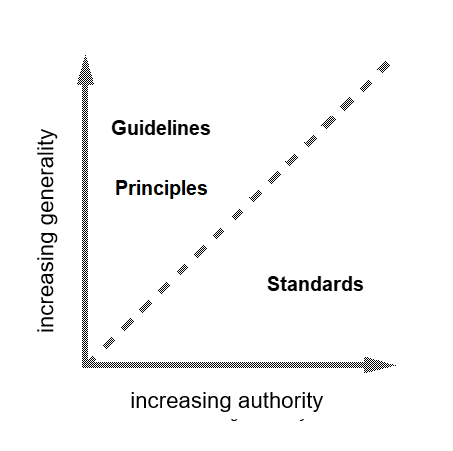
Design rules are classified on two dimensions:
- Authority: how mandatory the rule is.
- Generality: how broadly it applies.
| Rule type | Generality | Authority | Nature | Examples |
|---|---|---|---|---|
| 🌟 Principles | High | Low | High-level, abstract ideas; apply to all domains without fixing an implementation | "Provide feedback", "be consistent" |
| 📋 Guidelines | Moderate | Advisory | Recommended best practice and practical heuristics | Apple Human Interface Guidelines, Google Material Design |
| ⚖️ Standards | Low | High | Strictly binding, precise requirements | ISO 9241 (usability), W3C WCAG 2.1 (accessibility) |
As you go Principles → Guidelines → Standards, rules get more specific and more mandatory. A principle says "be readable". A guideline says "use 16 px body text". A standard says "text contrast must be at least 4.5 : 1".
2Three classic frameworks
Different HCI pioneers proposed rule sets that overlap heavily.
📖 Don Norman's design principles
| Principle | Meaning |
|---|---|
| Discoverability | Make possible actions visible |
| Feedback | Clear, immediate confirmation |
| Affordances | Properties that show how an object can be used |
| Signifiers | Explicit cues showing where and how to act |
| Mappings | Intuitive relationships between controls and effects |
| Constraints | Restrict wrong options |
| Conceptual models | A coherent mental simulation of how the system works |
🏆 Jakob Nielsen's 10 usability heuristics
- Visibility of system status
- Match between system and the real world
- User control and freedom
- Consistency and standards
- Error prevention
- Recognition rather than recall
- Flexibility and efficiency of use
- Aesthetic and minimalist design
- Help users recognise, diagnose and recover from errors
- Help and documentation
⚡ Ben Shneiderman's 8 golden rules
- Strive for consistency
- Enable frequent users to use shortcuts
- Offer informative feedback
- Design dialogs to yield closure (clear beginning, middle, end)
- Offer simple error handling
- Permit easy reversal of actions
- Support internal locus of control (the user feels in charge)
- Reduce short-term memory load
All three converge on visibility, feedback, consistency, error prevention and reducing memory load.
- Nielsen's 10: "Very Many Users Consider Errors Really Frustrating, Ask Help Here" (Visibility, Match, User control, Consistency, Error prevention, Recognition, Flexibility, Aesthetic, Help with errors, Help docs).
- Shneiderman's 8: "Consistent Shortcuts Feed Closure; Errors Reversible, Locus, Memory".
3The 15 universal design principles
| # | Principle | Meaning | Example |
|---|---|---|---|
| 1 | 🔍 Discoverability | Users can easily find what actions and tools exist and where | Visible toolbar instead of hidden gestures |
| 2 | 📢 Feedback | Immediate, perceptible, unambiguous confirmation of state changes | "Message sent ✓" |
| 3 | 🛑 Constraints | Limit options to prevent errors | Greyed-out invalid fields; date pickers |
| 4 | 🗺️ Mapping | Natural spatial and functional match between controls and results | Stove knobs laid out like the burners |
| 5 | 🔄 Consistency | Same terms, placement, icons and behaviour everywhere | "Save" always top-right with the same icon |
| 6 | 🚪 Affordance & signifiers | Visual traits show how an element is operated (push, slide, rotate) | A raised button looks pressable |
| 7 | 🏗️ Structure | Information organised hierarchically with logical grouping | Settings grouped into sections |
| 8 | ✨ Simplicity | Remove unnecessary widgets, steps and clutter | One-field search page |
| 9 | 🛡️ Tolerance (error grace) | Forgiving: undo/redo, trash can, safe recovery | Gmail "Undo send" |
| 10 | 🤝 Equity & inclusivity | Accessible to diverse abilities, colour-blind and elderly users | Screen-reader support, scalable text |
| 11 | 🎛️ Flexibility | Several pathways: wizards for novices, hotkeys for experts | Menu and Ctrl+S |
| 12 | 👁️ Perceptibility | Present crucial data through redundant channels (text + icon + sound + contrast) | Error = red and ⚠ icon and message |
| 13 | 🚀 Ease of use | Minimise cognitive load, physical steps and friction | One-tap reorder |
| 14 | 🛋️ Comfort & ergonomics | Reduce eye fatigue (dark/paper themes), RSI, mental exhaustion | Dark mode, comfortable font sizes |
| 15 | 📚 Documentation & help | Searchable, concise, task-focused help when edge cases arise | Contextual "?" help |
Expect:
- "Differentiate principles, guidelines and standards with examples"
- "List Nielsen's 10 heuristics" or "Shneiderman's 8 golden rules"
- "Explain N design principles with examples"
For each principle give meaning + example. Mapping (stove), constraints (date picker), tolerance (undo) and perceptibility (colour + icon) are easy, solid examples.
4Quick revision sheet
| Concept | Remember it as |
|---|---|
| Principles | High generality, low authority ("provide feedback") |
| Guidelines | Moderate, advisory (Apple HIG, Material Design) |
| Standards | Low generality, high authority, binding (ISO 9241, WCAG 2.1) |
| Norman | Discoverability, feedback, affordances, signifiers, mappings, constraints, conceptual models |
| Nielsen (10) | Visibility · Match real world · Control & freedom · Consistency · Error prevention · Recognition > recall · Flexibility · Minimalist · Error recovery · Help |
| Shneiderman (8) | Consistency · Shortcuts · Feedback · Closure · Error handling · Reversal · Locus of control · Memory load |
| Common core | Visibility, feedback, consistency, error prevention, memory load |
| 15 universal | Discoverability, Feedback, Constraints, Mapping, Consistency, Affordance, Structure, Simplicity, Tolerance, Equity, Flexibility, Perceptibility, Ease, Comfort, Documentation |
| Defensive design | Undo, non-destructive paths, confirm irreversible actions |
| Multi-modal | Never rely on colour alone |
?Self-check quiz
11 questions on this week. Answer them all, then press Check my answers. Your best and latest scores are saved and shown on the subject page.