Mental Models, Representations & Error Taxonomy
What mental models are, representations vs the implementation model, four traits of good representations, the full slip/mistake taxonomy, learned helplessness and expert blindness.
▶Lecture videos
Click any timestamp — here or inside the notes — to jump the video to that moment. Your position is remembered.
Basics of Mental Models
What a mental model is and how users build one.
00:03Introduction: mental models and representations01:02A mental model: your internal picture of how the world works02:37Using mental models to predict outcomes03:26Mismatched models cause user errors04:13Example: the light switchboard08:59Different users, different expectations10:31Designers can't know every user's model11:19The interface should teach the user13:01Designer as teacher: HCI meets educationRepresentations
How the interface represents the system to the user.
00:00Representations and the learning process00:54The interface represents the system02:27Mapping the mental model to the representation04:17Analogy: preparing for an interview06:56The interface design represents what's inside09:18Good representations make tasks easier10:10Grouping related controls together11:08Removing irrelevant detailDesign Principles, Mental Models & Representations
Consistency, affordance and mapping help users build accurate mental models.
00:01Consistency: users rely on past experience00:50Affordance: the interface teaches how to use it01:18Learnability, provision for error, and mappingSlips and Mistakes – Revisited
Norman's finer division: action-based and memory-lapse slips; rule-based, knowledge-based and memory-lapse mistakes.
00:14How good representation reduces slips and mistakes01:31Action-based slips: wrong action, or right action on the wrong object02:48Example: pressing the switch next to the right one03:50Example: the middle touchpad button brings up the scroller04:47Memory-lapse slips05:42Mistakes: rule-based, knowledge-based, memory-lapse06:51Memory-lapse slip vs memory-lapse mistakeLearned Helplessness & Expert Blindness
Two traps good designers must avoid.
00:50Learned helplessness: repeated failure kills faith in the interface01:53Don't let users fail continuously; provide for different learners (accessibility)02:40Expert blindness: familiarity hides the steps that are hard for novices1Mental models
A mental model is the internal explanation a person builds to simulate how a system works. It lets people anticipate consequences, predict system states and plan actions before touching the device.
A passenger pulls the overhead bell rope and expects a ding. If it doesn't ring, there are two possibilities:
- Mechanical breakage: the user's mental model is correct, but the physical implementation has failed.
- Silent change to electronic push buttons: the rope was disconnected without clear signifiers pointing passengers to the new seat buttons. The old mental model no longer applies, so passengers are confused and frustrated.
Great design either matches the users' intuitive expectations or naturally teaches a new model through use.
2Representations
A representation is the visual, structural and interactive presentation of the system given to the user.
- It is not a raw reflection of the code or database (the implementation model).
- It's a designed projection that matches the user's expected mental model.
Example: attaching a file to an email
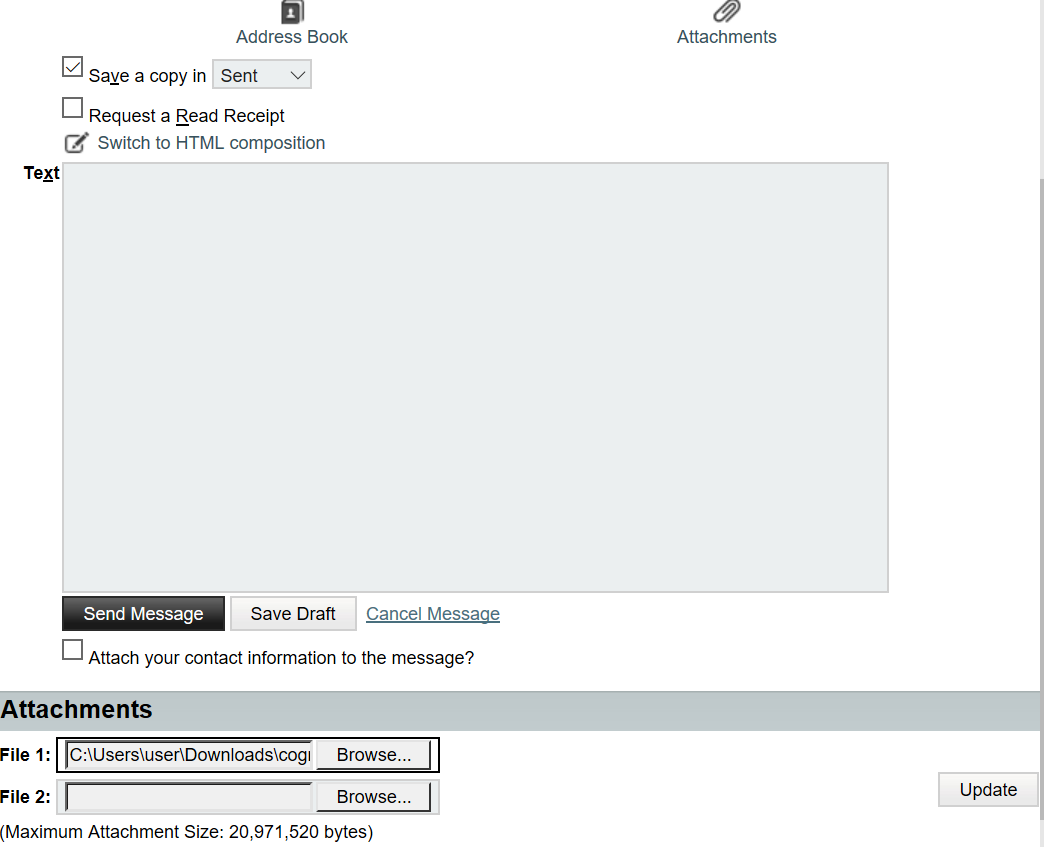
| ❌ Poor representation (legacy webmail) | ✨ Intuitive representation (modern Gmail) | |
|---|---|---|
| Flow | Click paperclip → sent to a separate bottom section → choose file → remember to click "Update" | Click paperclip → choose file in the native file explorer → attaches inline immediately |
| Result | Users often miss "Update" and lose their attachments | No extra confirmation steps |
3Four traits of good representations
| # | Characteristic | Meaning | Example |
|---|---|---|---|
| 1 | Make relationships explicit | Put conceptually linked elements close together to reduce searching and help decisions | Price shown right beside "Add to cart" |
| 2 | Bring objects and actions together | Put controls right next to the object they act on, not in a far-off toolbar | A delete ✕ on each list row |
| 3 | Exclude extraneous details | Strip out technical internals, backend codes and clutter | "Payment failed: card expired", not "ERR_0x8004" |
| 4 | Expose natural constraints | Make invalid actions physically or visually impossible | A date picker that blocks invalid days |
Principles that support accurate mental models 00:01
| Principle | Why it helps mental models |
|---|---|
| Consistency | People are biased towards past experience. They expect a new interface to work the way they've done things before |
| Affordance | The interface should teach the user how to use it 00:50 |
| Mapping | A good representation lets users predict the outcome of an action, so map interface elements to user actions 01:18 |
4Full error taxonomy: slips vs mistakes
Week 2 introduced slips vs mistakes. Norman divides them further 00:14:
| Category | Sub-type | Meaning | Example |
|---|---|---|---|
| SLIP (right goal, wrong execution) | ⚡ Action-based | The user knows the right action but performs the wrong action, or the right action on the wrong object 01:31 | Pressing the light switch next to the one you meant 02:48; clicking the middle touchpad button (scroller) instead of right-click 03:50 |
| ⏳ Memory-lapse | Knows the command but forgets a step in the immediate sequence 04:47 | Pressing F8 instead of F5 to refresh; forgetting to click "Update" when attaching | |
| MISTAKE (wrong goal or plan) | 📜 Rule-based | Correctly assesses the situation but applies the wrong rule or decision 05:42 | Knows the car is skidding but brakes hard (wrong rule) |
| 🧠 Knowledge-based | Assesses wrongly because of insufficient knowledge, giving a faulty mental model 06:51 | Thinks closing the laptop lid saves the document | |
| 🔄 Memory-lapse | Forgets the entire goal or action cycle, often after an interruption | Opens the browser to pay a bill, gets distracted, closes it with the bill unpaid |
- Slip: you know what to do but forgot one step at that moment.
- Mistake: you've forgotten the whole action cycle, so you don't know how to get around.
Slips are less serious: the intention was right, so improving the presentation usually fixes them. Mistakes need deeper fixes, like training or a better conceptual model. Rule-based mistakes in particular must be looked at seriously 05:42.
5Learned helplessness & expert blindness
A good designer must avoid two traps 00:50:
😞 Learned helplessness
Repeated failures on badly designed interfaces make users believe they personally can't handle the technology, so they give up learning.
After continuous failure there's no faith left. Even a new, improved method won't win them back 01:53.
Cure: - Forgiving interfaces - Clear success indicators - Non-judgemental error recovery - Provision for people who learn differently and at different speeds, which is why systems have accessibility options 01:53
🙈 Expert blindness
Designers become so familiar with a tool that the intermediate steps become invisible to them, so they leave out key cues for novices 02:40.
Analogy: giving directions to your house and forgetting key turns because they seem "obvious" to you.
Cure: test with real novices to expose hidden assumptions and missing signposts.
Expect:
- "Define mental model; give an example" (bus bell)
- "Explain representation with the attachment example"
- "List four characteristics of a good representation"
- "Classify these errors into the five sub-types"
- "Explain learned helplessness and expert blindness, and how to avoid them"
6Quick revision sheet
| Concept | Remember it as |
|---|---|
| Mental model | Internal simulation used to predict system behaviour |
| Bus bell | Correct model + broken mechanism vs changed system with no signifiers |
| Representation | UI layer matched to the user's model, not the implementation model |
| Attachment | Legacy "Update" step (lost files) vs inline Gmail attach |
| 4 traits | Explicit relationships · objects + actions together · exclude extraneous detail · expose constraints |
| Principles | Consistency, affordance, mapping support accurate models |
| Action slip | Wrong action, or right action on the wrong object |
| Memory-lapse slip | Forgot one step |
| Rule-based mistake | Right assessment, wrong rule |
| Knowledge-based mistake | Wrong assessment, lacks knowledge |
| Memory-lapse mistake | Forgot the whole goal or cycle |
| Learned helplessness | Repeated failure → user gives up; be forgiving, support different learners |
| Expert blindness | Designer misses "obvious" steps; test with novices |
?Self-check quiz
10 questions on this week. Answer them all, then press Check my answers. Your best and latest scores are saved and shown on the subject page.