Cognitive Modelling — GOMS, KLM & Fitts's Law
Predicting user performance before building anything: task analysis, the GOMS framework, keystroke-level model timings, Fitts's law, and the strengths and limits of predictive models.
▶Lecture videos
Click any timestamp — here or inside the notes — to jump the video to that moment. Your position is remembered.
Cognitive Modelling
What cognitive models are, why they don't need prototypes, and the GOMS / KLM / Fitts / MHP family.
00:00Cognitive modelling: predicting how users perform01:01Related to task analysis: tasks → sub-tasks02:00Theoretical roots in the 1970s–80s02:46Advantages: no prototype or real users needed04:09KLM: the lowest, operational level04:41GOMS: the umbrella (Goals, Operators, Methods, Selection rules)05:39Fitts's law: time to reach and act on a target06:25Model Human Processor (MHP) underlies them allGOMS Model
Goals, operators, methods and selection rules in detail.
00:00GOMS: the model underlying the earlier theories01:35GOMS as a description of knowledge02:29Goals, Operators, Methods, Selection rules03:55GOMS models expert users07:56Analysing tasks at a very detailed level09:40Worked example: methods and selection rules11:57"Unless other rules apply"Keystroke-Level Model (KLM)
Operators, their times, and how to add up a task.
00:00The Keystroke-Level Model (KLM)00:45Operators tied to the human motor system02:17Three categories of operators: physical, mental, system response03:55Execution time = pointing + homing + keystrokes + mental…04:40Pointing time (Fitts' law)06:19Operator times table (M = 1.35 s…)07:55Worked example: adding up the operators10:14Why shortcuts help expert users12:31Different users, different experience levels14:06Second example: inserting textFitts's Law
Placing M operators, then Fitts's law, the speed–accuracy trade-off and mobile-button examples.
00:00KLM: insert an M before every P that selects a command01:04Too many choices = too many M operators = slow03:38Fitts's law: time to move a pointer to a target04:39Distance and target width05:47MT = a + b·log₂(D/W + 1), a linear regression model06:44Speed–accuracy trade-off07:51Mobile phone: call and cut buttons are large08:58Applies to rapid pointing, not continuous movementGOMS (extra)
Additional explanation of GOMS.
00:00Introduction to GOMS00:46Why GOMS: predicting task time01:36Goals and subgoals03:10Methods: alternative ways (cab late → take a train)03:57Example: sending a video message04:49Operators: basic actions (typing, tapping)05:36Selection rules; assumes expert, error-free use1Task analysis & cognitive modelling
- Task analysis is the formal breakdown of what a user must do (physical actions and cognitive processing) to reach a desired system state.
- Cognitive modelling predicts how a person's mind works while using a particular UI: how they'd complete a task with that specific interface 01:01.
- Models don't need to be implemented or prototyped. You predict and assess mentally, without real users.
- They have explanatory power (theory explains behaviour) and give a foundation for design, as in other engineering fields.
- You can calculate performance times and compare workflows before writing code.
🖥 Information processor model
Human = input–output unit (the Model Human Processor, MHP). Focuses on keystrokes, pointing and perceptual cycles: GOMS, KLM.
🧠 Cognitive / predictor model
Focuses on mental simulations, hypotheses, problem-solving strategies and forming intentions.
The model family 04:09
| Model | Level | What it does |
|---|---|---|
| GOMS | Higher, abstract: the umbrella; structured and hierarchical like HTA | Goals, Operators, Methods, Selection rules |
| KLM | Lowest, operational | Times individual keystrokes, pointing, clicks |
| Fitts's law | Motor | Time to reach and act on a target |
| MHP (Model Human Processor) | Underlying | The model of human cognition beneath all of these |
The roots are 1970s–80s theory (Card, Moran & Newell) 02:00.
2The GOMS framework
GOMS (Card, Moran & Newell) models an expert doing goal-oriented, error-free tasks:
| Letter | Component | Meaning | Example: send a report to your manager |
|---|---|---|---|
| G | Goals | The high-level objective | "Send an official report to the manager" |
| O | Operators | Elementary perceptual, motor or cognitive actions | Click a button, type a key, scan a list |
| M | Methods | Ordered sequences of operators that achieve a (sub)goal | Method A: email · Method B: chat app |
| S | Selection rules | If-then logic choosing which method to use | IF formal or urgent THEN email ELSE chat |
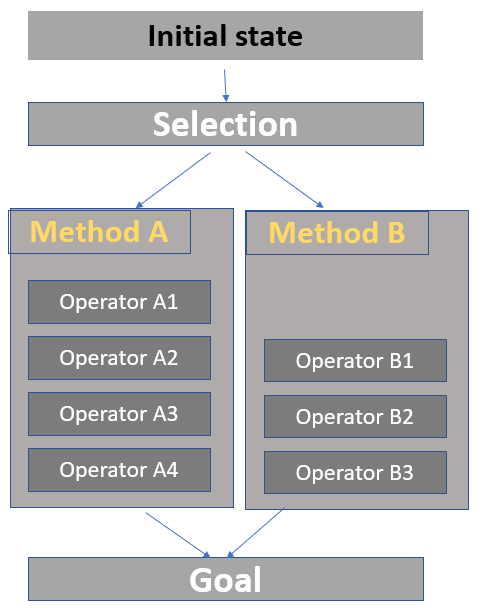
GOAL: Send report to manager
 ├─ [Selection rule] IF formal THEN use METHOD-A ELSE METHOD-B
 ├─ METHOD-A (Email):  open mail → click Compose → type address → attach file → click Send
 └─ METHOD-B (Chat):   open chat → find manager → drag file in → press Enter
3Keystroke-Level Model (KLM)
KLM is a simplified, quantitative version of GOMS. It calculates the execution time for an expert doing a routine task with no errors:
| Operator | Meaning | Typical time |
|---|---|---|
| K | Keystroke / button press | ~0.20 s (skilled typist 0.12 s, novice 0.40 s) |
| P | Pointing the mouse at a target | ~1.10 s |
| H | Homing: moving the hand between keyboard and mouse | ~0.40 s |
| M | Mental preparation before the next chunk | ~1.35 s (the largest) |
| D | Drawing with pen or mouse | Depends on the domain |
| R | System response time (waiting) | Depends on the system |
Insert an M before every P that selects a command. You must mentally prepare before every choice. M is the biggest operator, so too many commands to choose from means too many M's, which makes the task slow 01:04. Each operator time is an estimate; add them up for the total task time.
Click operators to build the sequence (click a chip to remove it). A preset fills in a typical task.
- Menu save: H + M + P + B B + M + P + B B = 0.4 + 1.35 + 1.1 + 0.2 + 1.35 + 1.1 + 0.2 = 5.70 s
- Ctrl+S: M + K + K = 1.35 + 0.2 + 0.2 = 1.75 s
That's why experts love shortcuts. (B = mouse button press or release, ≈ 0.1 s each.)
4Fitts's law
Fitts's law comes from product ergonomics and is easily adapted to UIs. It predicts the time to move a pointer (or finger) to a target 03:38.
MT = a + b · log₂(D / W + 1) (Shannon form, used in the lecture video 05:47)
| Symbol | Meaning |
|---|---|
| MT | Movement time |
| D | Distance (amplitude) to the target |
| W | Width of the target along the direction of movement |
| a, b | Constants from linear regression: a = intercept, b = slope |
| log₂(2D/W) | Index of Difficulty (ID) in bits |
Longer distance + smaller target = more time. The wider the target, the less time it takes; the narrower, the more.
What Fitts's law means for design
| Implication | Explanation |
|---|---|
| 🎯 Make important targets big | Larger W means a faster click. Primary call-to-action buttons need generous hit areas. On phones, the answer and end-call buttons are large 07:51 |
| 📏 Keep small targets close | If a target must be narrow, reduce the distance, which also cuts errors |
| 🖥 Use screen edges and corners | Edges have effectively infinite width (W = ∞), because the cursor stops at the edge: Windows Start menu, Mac Apple menu |
| ⚖️ Speed–accuracy trade-off | Fast movement + small targets = higher error rates 06:44 |
| ⚡ Scope | Applies to rapid pointing movements, not continuous movements 08:58 |
5Strengths and limits of predictive models
✅ Strengths
- Objective, repeatable numbers to compare prototypes
- Saves time and money: finds bottlenecks before user testing
- Breaks complex tasks into measurable micro-steps
⚠️ Limitations
- Assumes expert, error-free performance. No novice confusion, slips or exploring
- Ignores fatigue, stress, emotion, delight, creativity
- Hard to use when goals are unstructured or keep changing
Expect:
- "Explain GOMS with an example": draw the goal → methods → selection rule
- KLM time calculation: list the operators and add their times
- "State Fitts's law and give UI design implications": big targets, edges and corners, keep small targets close
- "Limitations of GOMS/KLM"
6Quick revision sheet
| Concept | Remember it as |
|---|---|
| Cognitive modelling | Predict performance with a specific UI; no prototype or users needed |
| Family | GOMS (umbrella) · KLM (lowest level) · Fitts (pointing) · MHP (underlying) |
| GOMS | Goals · Operators · Methods · Selection rules |
| KLM | T = K + P + H + D + M + R; expert, error-free |
| Times | K 0.2 · P 1.1 · H 0.4 · M 1.35 |
| M rule | Put an M before each P that selects a command; many choices = slow |
| Fitts | MT = a + b·log₂(2D/W); ID = log₂(2D/W) |
| Meaning | Far + small = slow; big + near = fast |
| Edges | Infinite width: Start menu, Apple menu |
| Trade-off | Speed vs accuracy; rapid pointing only |
| Limits | No novices or errors, no emotion or fatigue, structured goals only |
?Self-check quiz
11 questions on this week. Answer them all, then press Check my answers. Your best and latest scores are saved and shown on the subject page.