User-Centred Design & the Design Life Cycle
UCD vs specification-driven design, the 8 user characteristics, ISO 9241-210's 6 principles, the 4-phase iterative life cycle, and stakeholder-centred design (primary, secondary, tertiary).
▶Lecture videos
Click any timestamp — here or inside the notes — to jump the video to that moment. Your position is remembered.
User Centred Design – Basics
What UCD is and why users must be involved.
00:02Introduction to user-centred design (UCD)00:48Why UCD: designing for users' tasks03:12Example: Facebook mimicking real-world social behaviour04:02The problem with new designs04:53Evaluate, improve, repeat05:46What makes UCD specific: involving users throughout07:25Recognise what we don't know about the user09:59Requirements → development → evaluation with users10:51Keep an open mind; get user feedbackUser Centred Design – Principles
The principles that guide UCD.
00:00UCD principles: user variability01:32Principle 5: multidisciplinary teams03:13Understanding users, tasks and context04:56Involving real users (interviews), not fake ones06:39Iteration: no interface is perfect at release08:15Know what users do and expectCharacteristics of the User
The eight user characteristics and why the test group must be diverse.
00:00Iterate until the user is satisfied; test with real users01:22Role and age02:12Gender and education level03:04Cultural background and interests04:43Professional level and computer skills05:29Involve a diverse blend of users at every stepDesign Life Cycle – in Brief
Requirements → alternatives → prototype → evaluate, and the loops back.
00:07Establish requirements, then design alternatives01:22Not enough information? Go back to requirements02:27Hard to prototype? Revise the design alternative03:22Evaluation satisfied → final product; users involved at every stageStakeholder-Centred Design
From users to stakeholders: primary, secondary, tertiary (with the Moodle example).
00:47Stakeholders: anyone impacted by the design02:38Primary stakeholders = direct users03:37Secondary: interact with the output (Moodle → photocopy shop)04:33Tertiary: never touch the system or its output1What is user-centred design (UCD)?
The goal of any new interface is to meet user needs better than existing designs or workarounds.
- Most projects build interfaces for tasks people already do (often manually). The aim is not to invent a foreign activity but to do existing tasks more smoothly.
- Even genuinely new systems (like early Facebook) build on established human communication and social behaviour and on lessons from earlier chat and telecom systems.
Traditional software engineering builds around rigid, pre-agreed functional specifications. Developers assume they know what users want and never cross-check with real users. The result is 100% functional compliance but failed adoption, because the system doesn't match real mental models.
| 📋 Specification-driven design | 🎯 User-centred design | |
|---|---|---|
| Focus | System-centric: feature checklists, database efficiency, tidy architecture | Human-centric: starts by finding what we don't know about real users and their tasks |
| Users' needs | Presumed in isolation | Discovered with active user involvement at every stage |
| Feedback | Little or none until release | Iterative evaluation of low- to high-fidelity prototypes |
| Outcome | High risk of resistance, errors, abandonment | High usability, fast task completion, satisfaction |
Knowing HCI guidelines and heuristics helps you avoid obvious pitfalls, but it never guarantees success. Usability is contextual. Success needs continuous contact with real users in their natural environment.
2The 8 user characteristics
The user is the focal point, so analyse eight dimensions 01:22:
| # | Characteristic | Influences | Design example |
|---|---|---|---|
| 1 | 💼 Role | What the user does: goals, responsibilities, permissions, tasks | Admin vs cashier screens |
| 2 | ⏳ Age | Processing speed, working memory, eyesight, motor control | Elderly: more options and memory/recall aids, larger fonts 01:22 |
| 3 | 🎨 Gender | Preferences: colour theme, shape, texture, backdrop 02:12 | Theme options |
| 4 | 🎓 Education level | How fast they acquire knowledge, reasoning ability, tolerance for jargon | Plain language vs technical terms |
| 5 | 🌍 Cultural background | Customs, habits, metaphors, reading direction (LTR/RTL), colour symbolism (red = danger or celebration), vocabulary, mode of interaction 03:04 | Localised icons and wording |
| 6 | 💡 Interests | Psychological likes and dislikes, motivation, willingness to explore | Personalised content |
| 7 | 🏢 Professional level | Familiarity with domain terms, workflows and charts 04:43 | Expert dashboards |
| 8 | ⌨️ Computer literacy | Novices need wizards and signposts; experts want hotkeys. More skill means they expect less hand-holding | Dual pathways |
There's no "average user". Designers combine these 8 dimensions into concrete user personas (e.g. "Nimal, 62, retired teacher, low computer literacy, reads Sinhala") to guide design trade-offs.
Users take part in every step of the life cycle, so recruit a group with a broad blend of these characteristics. A narrow group gives a narrow view of your design.
3ISO 9241-210: the 6 UCD principles
| # | Principle | Meaning |
|---|---|---|
| 1 | Explicit understanding of users, tasks and environments | Start from evidence about who the users are, what they do, and the physical, social and operational context |
| 2 | Users involved throughout design and development | Not a one-off survey: contextual interviews, co-design / participatory design, usability trials across the whole life cycle |
| 3 | Design driven and refined by user-centred evaluation | Real feedback drives every change. Formative testing on early sketches; summative testing on high-fidelity versions against benchmarks |
| 4 | Iterative process | Never perfect first time: develop → test → critique → refine → test again |
| 5 | Address the whole user experience | Beyond buttons: expectations, brand, emotion, onboarding, error recovery, support, responsiveness |
| 6 | Multidisciplinary team | Engineers, UX/UI designers, cognitive psychologists, domain experts, ergonomists, technical writers, business stakeholders |
Understand · Involve · Evaluate · Iterate · Whole UX · Multidisciplinary
4The 4-phase interaction design life cycle
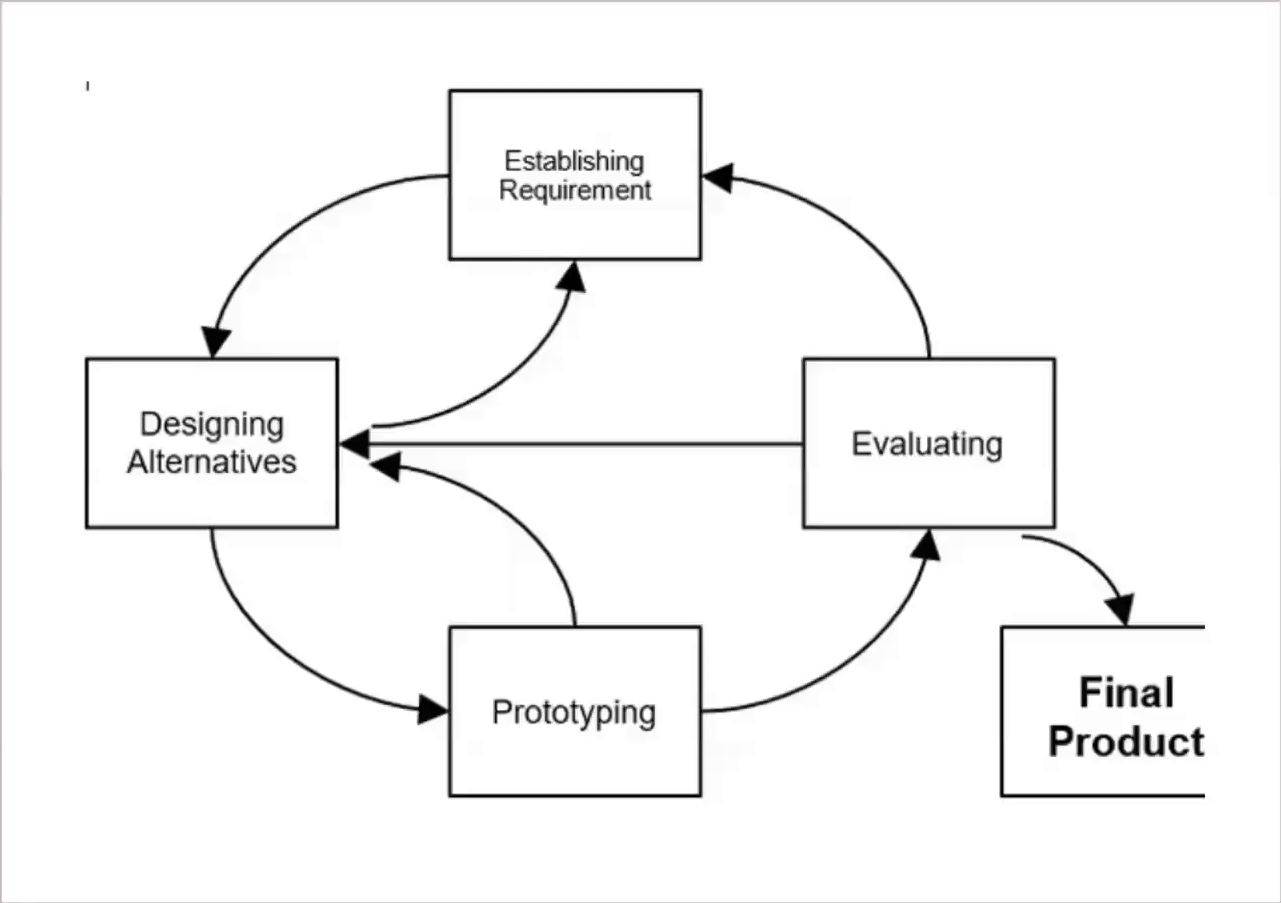
| Phase | What happens |
|---|---|
| 1. Establishing requirements (need-finding) | Find out who the users are, what tasks they must do, their constraints and the purpose. Use field observation, contextual inquiry, surveys, task analysis |
| 2. Designing alternatives | Create several different designs. This stops you locking onto or getting attached to your first idea |
| 3. Prototyping | Turn the best concepts into tangible artefacts. Low-fidelity (paper sketches, storyboards) first, then high-fidelity (clickable mock-ups) |
| 4. Evaluation | Real users try the prototypes. Measure usability and error rates, collect impressions, find pain points. The insights feed the next cycle |
- Not enough information to design alternatives → revisit requirements.
- Hard to prototype a design → change the design alternative 02:27.
- Evaluation finds missing things → back to requirements.
- Evaluation finds inadequate designs → back to design alternatives.
When evaluation is satisfied, the design is developed into the final product 03:22.
Fixing a conceptual flaw on a paper sketch costs pennies and minutes. Fixing it after the backend is written and deployed can cost up to 100× more in rework, technical debt and lost trust.
In UCD, users are involved at every stage: requirements, alternatives, prototyping, evaluation, and even the final product and documentation 03:22.
5Stakeholder-centred design
UCD focuses on the person at the screen, but systems affect a wider group. Stakeholders are everyone impacted by the design 00:47.
| Tier | Who | Interaction | Design concern |
|---|---|---|---|
| Primary | Direct users | Operate the interface hands-on | Ergonomics, clarity, low cognitive load, speed, error prevention |
| Secondary | Rely on the output / reports | Don't use the interface, but use its output | Format, readability, accuracy, timeliness, delivery channel |
| Tertiary | Everyone else affected | Never touch the system or its output, yet their lives or workloads change | Sustainability, workload balance, ethics, preventing strain or exploitation |
- Primary: students and lecturers using Moodle.
- Secondary: the photocopy shop, which gets a "report" of which notes students no longer need printed, based on what's on Moodle 04:33.
- Tertiary: people who never interact with Moodle or its output but are still affected.
A truly successful design accounts for ripple effects across all three tiers: an efficient clerk portal, helpful resident SMS, and protection for the sanitation workers.
Expect:
- "Differentiate UCD and specification-driven design"
- "Explain the 8 user characteristics"
- "List ISO 9241-210's six principles"
- "Explain the design life cycle with a diagram" (include the loops)
- "Identify primary/secondary/tertiary stakeholders for system X". Use the Municipal Council or Moodle examples as models.
6Quick revision sheet
| Concept | Remember it as |
|---|---|
| UCD | Discover what we don't know about users; involve them throughout |
| Spec-driven | Assumes needs; 100% spec, fails adoption |
| Guidelines | Necessary but not sufficient; usability is contextual |
| 8 characteristics | Role · Age · Gender · Education · Culture · Interests · Professional level · Computer literacy |
| Personas | Concrete profiles, not an "average user" |
| ISO 9241-210 | Understand · Involve · Evaluate · Iterate · Whole UX · Multidisciplinary |
| Life cycle | Requirements → Alternatives → Prototype → Evaluate (loop) |
| Fidelity | Low (paper) → high (clickable) |
| Cost | Fixing late costs up to 100× |
| Primary | Use the interface |
| Secondary | Use the output (residents' SMS, photocopy shop) |
| Tertiary | Affected without contact (sanitation workers) |
?Self-check quiz
11 questions on this week. Answer them all, then press Check my answers. Your best and latest scores are saved and shown on the subject page.